DepthX - Live Clock Wallpapers
- 4.1
- Rating
- 1.00M
- Installs
- Free
- Price
 Analysis by App-foxy
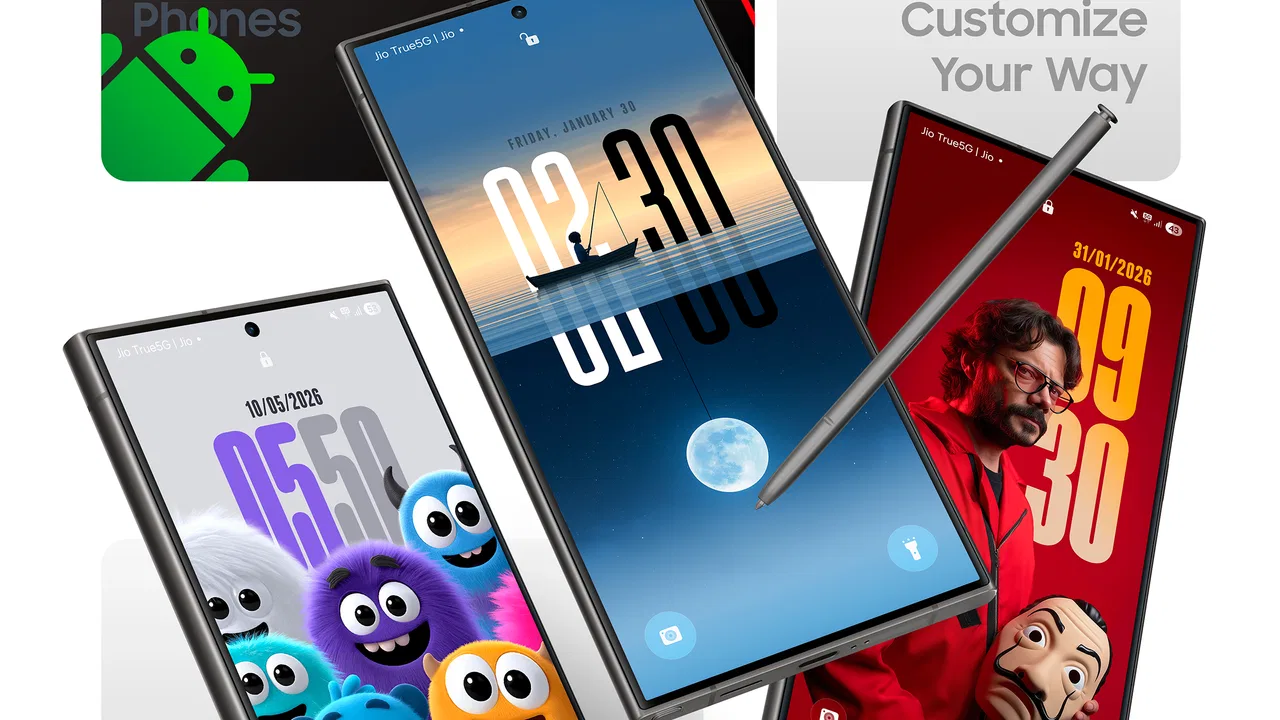
DepthX - Live Clock Wallpapers takes a familiar personalization idea and gives it a more visual, time-aware character. After spending time with it, I see it as a good choice for people who want their phone background to feel more like part of the interface than a static picture. The central appeal is the combination of three-dimensional depth styling and a clock that remains visible within the wallpaper design, rather than treating the background and time display as completely separate elements.
That approach makes the app easy to understand, but its value depends heavily on your taste. If you enjoy a phone that looks expressive every time you wake the screen, this app has a clear purpose. If you prefer a quiet background, maximum battery efficiency, or the cleanest possible lock screen, the extra movement and visual layering may feel unnecessary. My overall view is positive, with one important qualification: this is best treated as a style-focused personalization tool, not as a complete replacement for every wallpaper option built into Android or iOS.
How the depth-and-clock concept works in daily use
The strongest part of DepthX is the way it combines two things I normally choose separately: a wallpaper with a sense of layered space and a clock that belongs to the visual composition. A normal still image can look attractive, but it often becomes background noise after a few days. A live clock wallpaper has a better chance of staying useful because the time is part of what you see whenever you check the phone.
You May Also Like

 Blood Strike: 2.5 Anniversary
Blood Strike’s Loadouts Turn Every Drop Into a Tactical Gamble
A close look at Blood Strike’s custom loadouts: how fast access to signature weapons reshapes its battle royale rhythm, rewards preparation, and narrows the gap between fights.

 Pandora - Music & Podcasts
Pandora’s Music Is Easy to Start, but Harder to Recover
Pandora’s strength is its low-effort path from a seed to a station. Its weak spot is how much confidence it asks you to place in connection, setup, and quiet recovery.

 8 Ball Pool
 Is Built on Rivalries, Rematches, and Routine
A close look at the rivalries, rematches, shared routines, and unanswered safety questions that turn a quick pool match into a persistent mobile community.

 Samsung Music
’s Quiet Strength Is Playing What You Already Own
Its reach comes less from spectacle than from dependable access to a personal library. That simplicity is both the app’s strongest retention engine and its ceiling.

 AccuWeather: Weather Radar
AccuWeather Review: A Quick, Clear Forecast for Everyday Decisions
For everyday plans, the best forecast is the one you can understand quickly. AccuWeather makes rain timing, radar, and local conditions easy to act on, with a few trade-offs.

 Hill Climb Racing
Why Hill Climb Racing Still Turns Crashes Into One More Run
A tiny car, a bumpy hill and one more upgrade: Hill Climb Racing keeps resurfacing because its simple chaos makes every near-miss feel personal.
More From Our News Desk



I found this especially appealing on a lock screen or home screen where the clock is already something I look for. Instead of placing a plain digital time over an unrelated photograph, the design aims to make the clock feel intentional. That distinction matters. The wallpaper is not only decorative; it also changes the first visual impression of the device.
The three-dimensional effect is another reason the app stands apart from a standard image gallery. Depth can make a subject appear closer while the background recedes, giving the screen more visual structure. Used carefully, that can make a familiar phone feel refreshed without requiring a complete theme overhaul. The result is more noticeable than changing from one ordinary photograph to another.
There is also a practical advantage to keeping the clock inside the wallpaper experience: you can choose a design around the way you actually check the time. For example, a person who frequently glances at the lock screen may appreciate a composition where the clock is easy to spot. Someone who wants the image to remain the main attraction may prefer a less dominant arrangement. The best result comes from matching the artwork to your habits rather than choosing the most dramatic-looking option automatically.
One useful tip is to judge a wallpaper while the phone is being used, not only while viewing its preview. A design that looks impressive in a store image can become distracting when app icons, notifications, and the system clock are placed over it. I would test the background with the brightness I normally use and with several common notifications visible. Depth effects can lose their elegance when too many elements compete for the same space.
Why the live clock is more than a decorative extra
The clock gives the app a small but meaningful everyday advantage. A purely animated wallpaper may catch attention for a moment, yet it does not necessarily improve the way I interact with the phone. A clock creates a reason to look at the screen, so the visual effect has a practical anchor.
That does not mean every clock arrangement will be equally readable. Dark imagery, bright highlights, and layered subjects can make time harder to see if the composition is busy. I would prioritize contrast over novelty, particularly if the phone is used outdoors or in a bright room. A beautiful background is not successful if I have to search for the time.
Another consideration is how the wallpaper fits around widgets. People who use weather, calendar, battery, or fitness widgets may have less free space for a large visual composition. In that situation, I would choose a simpler depth style and leave the clearest area for the information I check most often. The app is more enjoyable when it complements the home screen instead of forcing every other element into a crowded layout.
This is one of the less obvious trade-offs with personalization apps: the most visually ambitious option is not always the most usable one. DepthX is at its best when the clock, image, icons, and widgets share the screen comfortably. A restrained design can therefore be a better daily choice than the wallpaper that produces the biggest first impression.
Where it compares well with ordinary wallpaper tools
Built-in wallpaper selectors are usually quicker and simpler. They are convenient when I want to apply a photograph, use a system background, or change the lock and home screens with minimal adjustment. They also tend to suit people who do not want their background to draw attention. DepthX offers a different experience by making the wallpaper itself the feature.
Static wallpaper apps can provide a broader range of photographs or illustrations, and they may be preferable for someone who wants a personal image to remain unchanged. A family photo, a travel picture, or a carefully edited landscape often benefits from staying still. DepthX is more suitable when the goal is a designed screen rather than merely finding a nice picture.
Compared with other live wallpaper approaches, the clock gives this app a clearer identity. Some animated backgrounds focus almost entirely on motion, particles, or visual atmosphere. That can be entertaining, but it may also become tiring or feel disconnected from everyday use. DepthX has a more focused concept: the movement and depth are there to support a time display and a stronger sense of screen presence.
I would not choose it simply because live wallpapers sound more advanced. The right comparison is about what I want the phone to communicate. If I want calm, low-distraction utility, a standard still image wins. If I want the lock screen to feel more personal and noticeable, the depth-and-clock combination is more distinctive.
What I liked, and where the experience needs care
The biggest strength is its immediate visual payoff. A suitable design can make an ordinary device feel more individual within a few minutes. That is valuable for users who are bored with the same background but do not want to install a full launcher, icon pack, or complicated theme system. The app stays focused on one visible part of the phone, which makes the change easy to appreciate.
I also like that the concept has a functional center. The clock is not an unrelated add-on placed beside the wallpaper; it helps explain why the screen should be checked repeatedly. This makes the app easier to recommend to someone who wants personalization with at least a small practical benefit.
The main weakness is that visual impact can come with visual fatigue. A wallpaper that feels exciting on the first day may become distracting when seen dozens of times. I would be selective about using the most intense depth treatment on the main screen, especially if I already receive many notifications. A calmer option may be better for workdays, while a more dramatic design can suit a personal device or a weekend change.
Live content also deserves a realistic battery expectation. I would not assume that a moving wallpaper behaves exactly like a still image, particularly on a phone where battery life is already a concern. The sensible approach is to observe the device over normal use rather than judging from a short test. If battery endurance matters more than appearance, a static alternative remains the safer choice.
There is a similar trade-off with performance. Older or less powerful phones may not feel as comfortable with visually richer backgrounds as newer devices. DepthX supports Android starting with version seven, which makes it accessible to a wide range of phones, but compatibility does not guarantee that every device will deliver the same smooth experience. I would keep an eye on responsiveness after applying it, especially when switching between screens or opening frequently used apps.
Another point worth considering is the purchase model. The app is free to install, but optional in-app items range from ninety-nine cents to thirty-nine dollars and ninety-nine cents each. That does not automatically make it poor value, yet it means I would look closely at what is included before paying for additional content. For casual users, the free experience may be enough. For someone who wants a large collection or premium-looking designs, the total cost can become more important than the initial download price.
The age classification is Everyone, so the app is positioned as suitable for a broad audience. I still think the best audience is defined more by screen habits than by age. A child, student, professional, or older user could enjoy it if they like expressive backgrounds, while a person of any age who values simplicity may prefer the phone’s standard wallpaper controls.
Three practical ways I would get more from it
First, I would choose the wallpaper around the clock’s readability rather than selecting an image in isolation. Look for a background with a relatively calm area where the time can remain visible. This is a small decision, but it prevents the common problem of a striking image becoming inconvenient every time the screen wakes.
Second, I would use separate thinking for the lock screen and home screen. The lock screen benefits from a design that makes the clock easy to find, while the home screen needs enough visual breathing room for icons and widgets. If the same composition looks good in one location but crowded in the other, I would prioritize usability instead of forcing one style everywhere.
Third, I would rotate designs according to context rather than changing them randomly. A restrained depth wallpaper can suit reading, work, or navigation, while a more expressive design may be enjoyable when I want the device to feel more personal. This turns the app from a one-time novelty into a small routine for refreshing the phone without rebuilding its entire appearance.
A fourth useful habit is to check the screen in both bright and dim conditions. A wallpaper can be readable at night but wash out in daylight, or look balanced indoors and become too busy outside. Testing those situations helps reveal whether the depth effect is genuinely usable or merely attractive in a controlled preview.
Who should install it, and who should skip it
I would recommend DepthX to someone who wants the phone to stand out without committing to a full customization project. It is particularly appealing if you check the lock screen often, enjoy layered visual design, and like the idea of a clock that feels integrated with the background. It also suits people who change their wallpaper regularly and want more than a rotating set of ordinary photographs.
It is a weaker fit for users who keep their phone on battery-saving settings, rely on a very busy widget layout, or prefer a distraction-free interface. It may also disappoint anyone expecting a complete personalization suite with extensive control over every system element. The app’s identity is narrower and more focused: it changes the visual character of the screen through depth-oriented wallpaper and a live clock.
If I were recommending it to a friend, I would first ask what they dislike about their current background. If the answer is “it feels boring,” this app is a sensible experiment. If the answer is “I can never read my notifications quickly” or “my battery already struggles,” a static wallpaper or a simpler system option would probably be better.
The developer behind it is AppsLab Co., and the current release is version one point one. That early version number makes me approach the app with reasonable expectations: I would enjoy what is already present, but I would not base a purchase decision on assumptions about future additions. The important question is whether the available style and clock experience are useful to me now.
My final take on DepthX
DepthX - Live Clock Wallpapers succeeds because it gives personalization a clear purpose. It is not merely trying to make the phone look different; it connects a layered visual background with something I check constantly. That combination makes the app more memorable than a basic wallpaper picker and more practical than an animation that serves no daily function.
Its limitations are equally clear. The strongest designs may compete with icons and widgets, live presentation may not suit every battery-conscious user, and the optional purchase range means I would explore the free experience carefully before spending more. Those are not reasons to dismiss it, but they do make the app better for selective users than for everyone.
The app has an average rating of four point three from over eight hundred ratings, and it has passed one hundred thousand installs. Those figures suggest that the idea has found an audience, but my recommendation rests more on the actual fit between the design and your habits. I would try it if you want a more expressive lock screen and are willing to choose readability over maximum visual intensity.
My verdict is that DepthX is a focused, attractive personalization app with a worthwhile everyday hook. I would recommend it to users who want their phone to feel more alive and distinctive, especially when a standard photograph no longer feels satisfying. I would skip it in favor of a static background when calm presentation, widget space, or battery endurance matters more than visual character.
FAQs for DepthX - Live Clock Wallpapers
01What makes DepthX - Live Clock Wallpapers unique compared to other wallpaper apps?
DepthX stands out with its immersive live clock wallpapers that not only enhance your device's aesthetics but also provide real-time functionality. The app combines stunning visuals with a practical clock feature, allowing users to customize their home screens with dynamic, interactive backgrounds that update with the time.
02How does DepthX impact my device's battery life?
The app is designed with battery efficiency in mind. While live wallpapers can consume more power than static ones, DepthX optimizes animations and updates to minimize battery drain. Users can adjust settings to reduce activity and save battery, ensuring a balance between performance and aesthetics.
03Is DepthX compatible with all Android and iOS devices?
DepthX is compatible with most modern Android and iOS devices. However, older devices may experience reduced performance due to hardware limitations. It's recommended to check the app's requirements on the download page to ensure compatibility with your specific device model and operating system version.
04Can I customize the clock and wallpaper settings in DepthX?
Yes, DepthX offers extensive customization options. Users can choose from a variety of clock styles and wallpaper themes. The app allows for adjusting colors, animations, and layout preferences, providing a personalized experience that matches individual tastes and device themes.
05Are there any in-app purchases or ads in DepthX?
DepthX offers both free and premium versions. The free version includes ads and limited features, while the premium version provides an ad-free experience with access to exclusive wallpapers and advanced customization options. Users can choose to upgrade for a more comprehensive experience.
Pros
- Stunning animated clock designs.
- Customizable color and style options.
- Smooth performance with no lag.
- Battery-friendly live wallpaper.
- Supports both portrait and landscape.
Cons
- Limited free design options.
- In-app purchases can be pricey.
- Requires constant internet connection.
- Occasional ad pop-ups.
- Some features locked behind paywall.

DepthX - Live Clock Wallpapers
Gallery